Hold one button. Ship the fix.
Ploink gives every project on your Mac its own launch button. Tap F5 in any app, hold for 0.65 seconds, and your own deploy command runs with a live readout. When your coding agent asks to deploy, you say yes with the same hold.
Free, MIT-licensed core · $19 founding price, $29 later · full refund until 30 days after the signed build ships
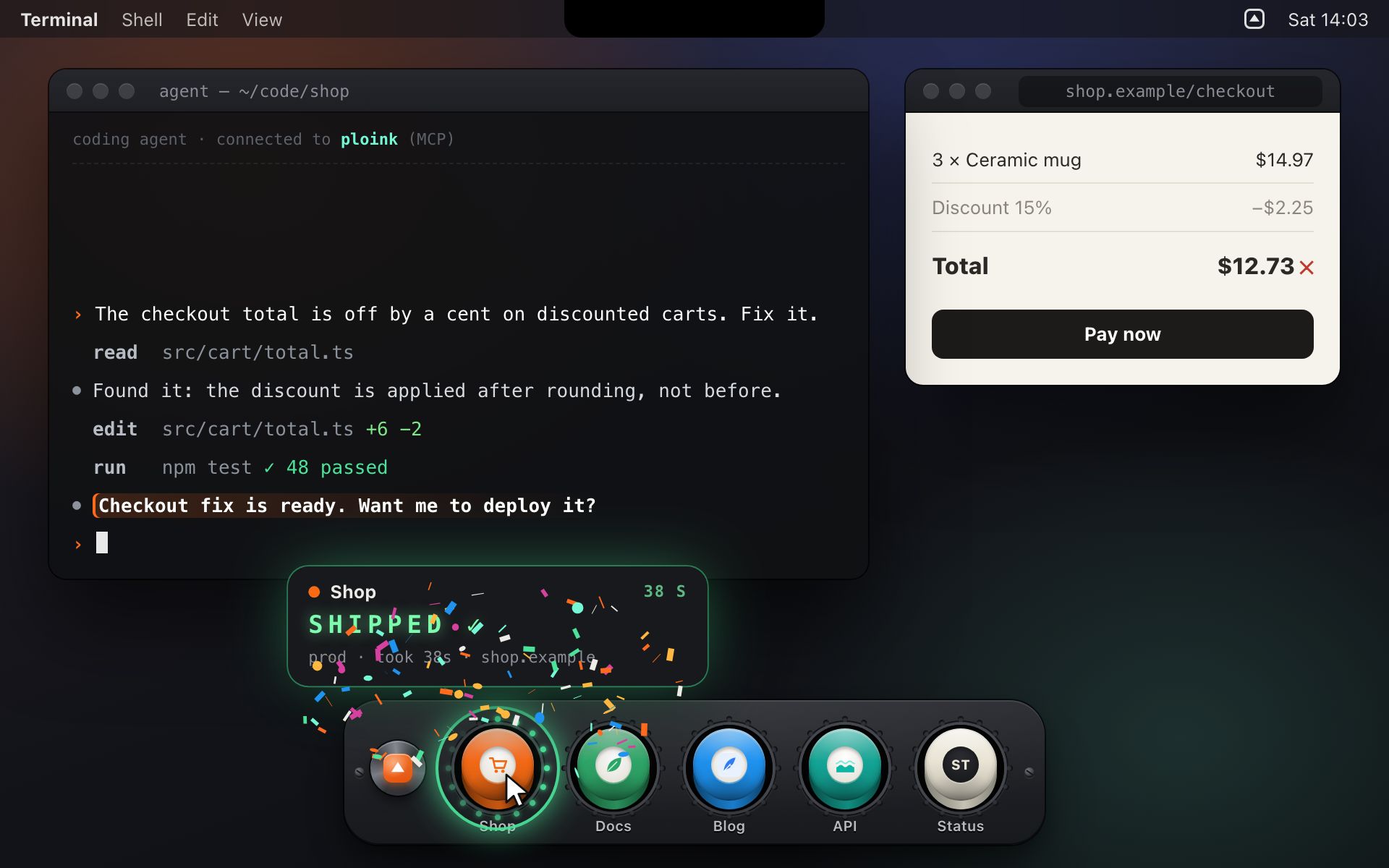
Your agent fixed it in two minutes. Then the deploy dance starts.
- 1Find the terminal tab for the right repo.Which of the ten was it again?
- 2Remember the command.
npm run deploy?wrangler deploy --env production?./deploy.sh? - 3Watch the log scroll.Because you are not sure when it is safe to look away.
- 4Switch back and lose the thread.Then check later whether it actually went out.
“Just let the agent deploy”
An agent with shell access can deploy anything, any time, without asking. You hope it picked the right project, the right branch and the right command.
“Just set up CI”
YAML, your secrets in someone else’s cloud, and a queue in front of a 30-second deploy. For ten small sites, that’s a lot of plumbing.
“Just alias it”
Aliases still need a terminal, the right folder and your full attention while it runs. And your agent can’t ask an alias for permission.
One button per project. One key to reach them all.
Hold to launch. Let go to cancel.
Press and hold. The LED ring charges for 0.65 seconds, then the cap slams down and your deploy starts. Let go early and nothing happens, so a stray click never ships anything.
While it runs, the readout shows a live timer and the latest log line. Success sweeps the ring green and fires confetti. Failure shakes the bay and shows the error line.
Works with the mouse, a trackpad, touch, or Space on the keyboard. This one is a pretend deploy.
A launch bar slides in over whatever you’re doing.
Tap F5 and a slim bar of mini buttons slides up from the screen edge, or grows out of the MacBook notch. It works over full-screen apps and on every Space. Hover for status, hold to deploy.
Your agent asks. The button glows. You hold.
Ploink runs a local MCP server. Claude Code, Codex, Cursor or any MCP client can list projects, start a deploy, wait for it and read the logs. Turn on Ask me first and every agent deploy waits for your hold.
$ claude mcp add --transport http --scope user \
ploink http://127.0.0.1:47321/mcpA receipt for everything that shipped.
Who started each deploy (you, an agent, the menu bar), what shipped, how long it took, what failed and why. Agents can read the same log.
It finds the deploy command for you.
Drop a project folder on the window. Ploink reads it and picks the deploy command, the package manager, the site URL and the icon.
npm / pnpm / yarn / bun scriptswrangler deployvercel deploy --prodnetlify deploy --prodfly deployfirebase deploymake deploy./deploy.sh
No runners. No cloud. No YAML.
Commands run as $SHELL -lc in the project folder, with your login environment. So nvm, Homebrew and your Wrangler login just work. It ships exactly what is on your disk.
Don’t trust the copy. Read the code.
Every line that touches your shell is public.
Ploink runs commands and opens a local server, so you should be able to read it before you trust it. The core app is about 5,000 lines of plain JavaScript, MIT-licensed.
Read the code on GitHubgithub.com/petarjs/ploink“I run about ten small sites on Cloudflare, and each one deploys a little differently. My agents were finishing fixes faster than I could ship them. Ploink is the button I wanted, and it’s how I deploy every day.”
 Petar Slovic
maker of Ploink, indie developer
| Hold to launch | 650 ms (0–1.5 s) |
|---|---|
| LEDs per console button | 24 |
| MCP tools | 8 |
| Agent request expires | after 10 min |
| Deploy timeout | 30 min |
| Projects | unlimited |
| Deploys at once | one per project |
| Confetti on failure | none, ever |
Join the first 50 founders. Pay $19 once.
- Ploink Pro for all of 1.xAgent guardrails, checks before and after a deploy, chains and “deploy all”, triggers from links, Shortcuts and Raycast, Slack or Discord alerts, themes and sound packs.
- The beta todayStart using it now. It is unsigned, so the first launch takes a right-click → Open.
- The signed build, firstSigned and notarized, with auto-updates, by 31 January 2027.
- A vote on what Pro builds firstFounders pick the order of the Pro features.
- Your name in the creditsIn the About window, if you want it there.
- The founding price, lockedYou never pay the $29.
You get a receipt and the beta download link by email. Prices in USD; tax may be added at checkout.
By pre-ordering you agree to the Terms of Sale and the Refund Policy.
You can’t lose the $19.
- Before it ships: changed your mind? Full refund, any time.
- Fewer than 50 founders by 19 December 2026? Everyone is refunded automatically, and the core stays free.
- No signed build by 31 January 2027? Everyone is refunded automatically.
- After it ships: a refund for any reason for 30 days. Reply to your receipt.
Where the money goes
Apple charges $99 a year before a Mac app can be signed. Six founders pay for that. 50 founders pay for the time to build Pro.
Free forever, MIT
- Unlimited projects and buttons
- F5 launch bar, edges and notch
- MCP server for your agents
- Agent approvals (Ask me first)
- Flight log and deploy logs
Everything in the app today stays free. Pro adds automation on top.
Not ready to pay? Get on the list.
One email when the signed build ships, or when your platform is next. Nothing else.
Three steps to your first one-hold deploy.
Pre-order
Pay $19. The beta download link arrives by email.
Add your projects
Drop your project folders on the window. Paste one line to connect your coding agent.
Hold to ship
Press F5, hold, watch it fly. The signed build and your Pro key arrive by 31 January 2027, then it updates itself.
The rough edges, up front.
Is the app signed?
Not yet. The beta is unsigned, so macOS asks you to confirm the first launch (right-click the app → Open, or System Settings → Privacy & Security → Open Anyway). Founder money pays for the Apple Developer account. The signed, notarized build comes by 31 January 2027, or you get your money back.
Is Ploink free or paid?
Both. The core app is free and MIT-licensed, with unlimited projects. Ploink Pro adds automation and agent-safety features as a one-time purchase: $29 after launch, $19 for founders.
Can an agent deploy without me?
Only if you allow it. Choose “Ask me first” for all projects or for one project. Then an agent’s request makes the button glow amber, with the agent’s reason on the readout, until you hold it or click Deny. Requests expire after 10 minutes.
Does my code or my secrets go anywhere?
Ploink has no server and no account. Deploy commands run on your Mac, in your login shell, in the project folder. The MCP server listens on 127.0.0.1 only and rejects requests from web pages. Other programs running as your user can still call it, the same as they could run your deploy scripts, so you can turn the agent link off in Settings.
Which deploy tools does it support?
Anything you can run in a terminal. It detects package.json deploy scripts (npm, pnpm, yarn, bun), wrangler, vercel, netlify, fly, firebase, make deploy and ./deploy.sh. You can also type any command and add several per project, like prod and preview.
Which coding agents work with it?
Any MCP client: Claude Code, Codex, Cursor, Windsurf and others, over HTTP or stdio. Ploink is not affiliated with any of them.
What about Windows and Linux?
Mac first. Ploink is built with Electron, so a port is possible. The waitlist decides which platform comes next.
Why is the download so big?
It is an Electron app, so it ships its own browser engine (about 260 MB on disk). That is the trade-off for one person shipping it fast. A smaller native build is not planned for 1.0.
What if Ploink never ships?
You get a full refund (see the guarantee above). And because the core is MIT, the app you have keeps working, and anyone can fork it.
Your agent is asking. Hold the button.
$19 once for founders. Full refund until 30 days after the signed build ships. Refund Policy